弹窗
弹窗在页面上方显示需要确认、引导或等待的内容。
按用途引入。一个页面可以只用其中一类。
| 标签 | 何时使用 |
|---|
<md-modal> | 需要确认的内容。有遮罩,点遮罩或按 Esc 会取消 |
<md-hero-modal> | 带主图的说明。有遮罩 |
<md-feature-tour-modal> | 贴在页面旁边分步说明。没有遮罩 |
<md-loading-modal> | 处理过程中的等待。遮罩和 Esc 都不关 |
content_copy
check
import 'genv4/modal/modal.js';
import 'genv4/hero-modal/hero-modal.js';
import 'genv4/feature-tour-modal/feature-tour-modal.js';
import 'genv4/loading-modal/loading-modal.js';
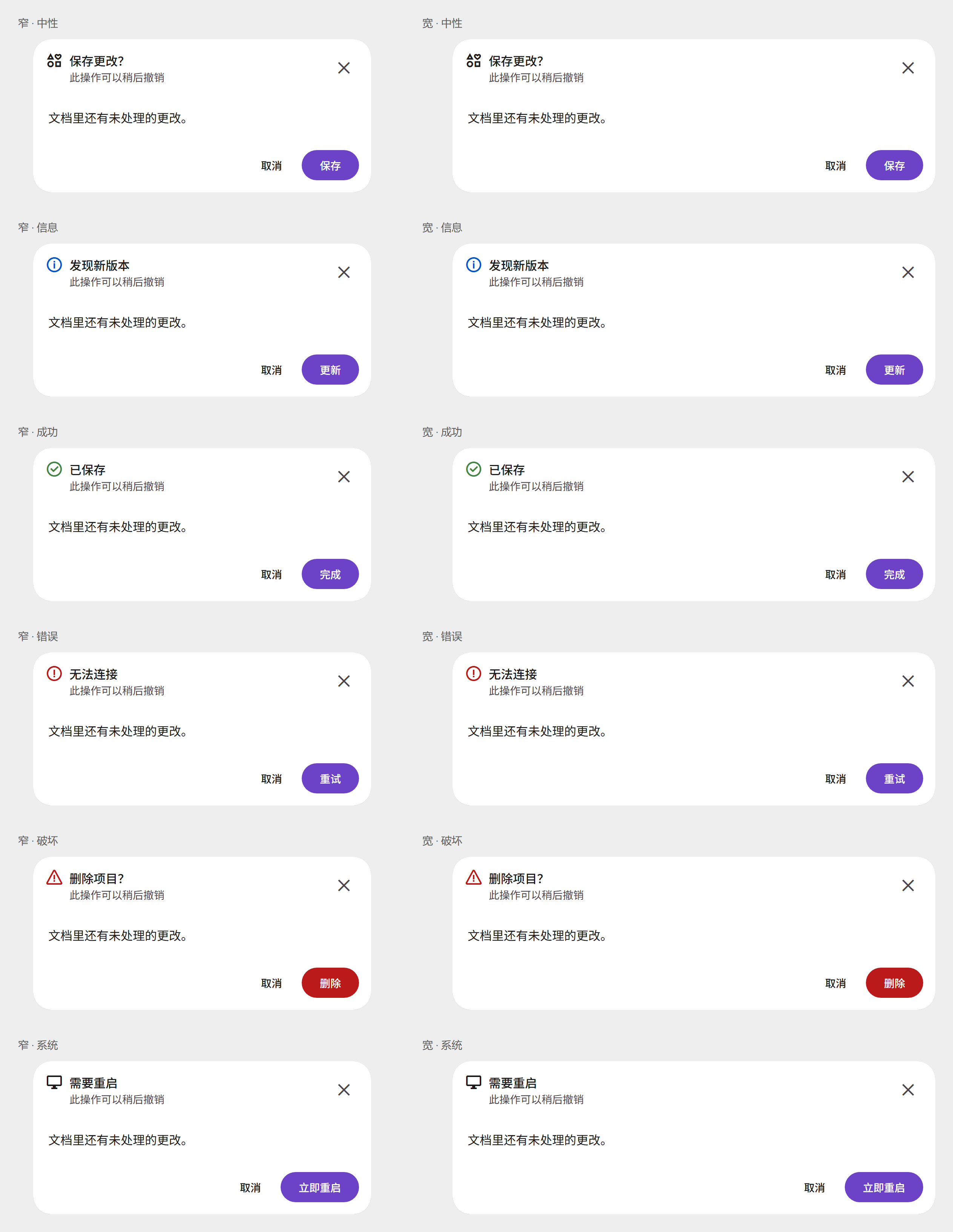
每类一张图,把这一类的主要样子放在一起。下面各一份代码,写上可用属性。returnValue 没有 HTML 属性。默认就是开的布尔属性写在标签上只是标出它;要关掉只能在脚本里设为 false。
左边一列是窄版,右边一列是宽版。每列从中性、信息、成功、错误、破坏到系统。
content_copy
check
<md-modal open variant="destructive" size="wide" layout="horizontal"
    content-margin leading-item icon="delete" close title="删除项目?"
    show-subtitle subtitle="此操作无法撤销"
    show-cancel show-secondary-action show-tertiary-action tertiary="checkbox">
  <p>「GenV4 文档」及其 12 个文件会被永久删除。</p>
  <span slot="tertiary">不再提示</span>
  <span slot="cancel">取消</span>
  <span slot="secondary">移到回收站</span>
  <span slot="primary">删除</span>
</md-modal>
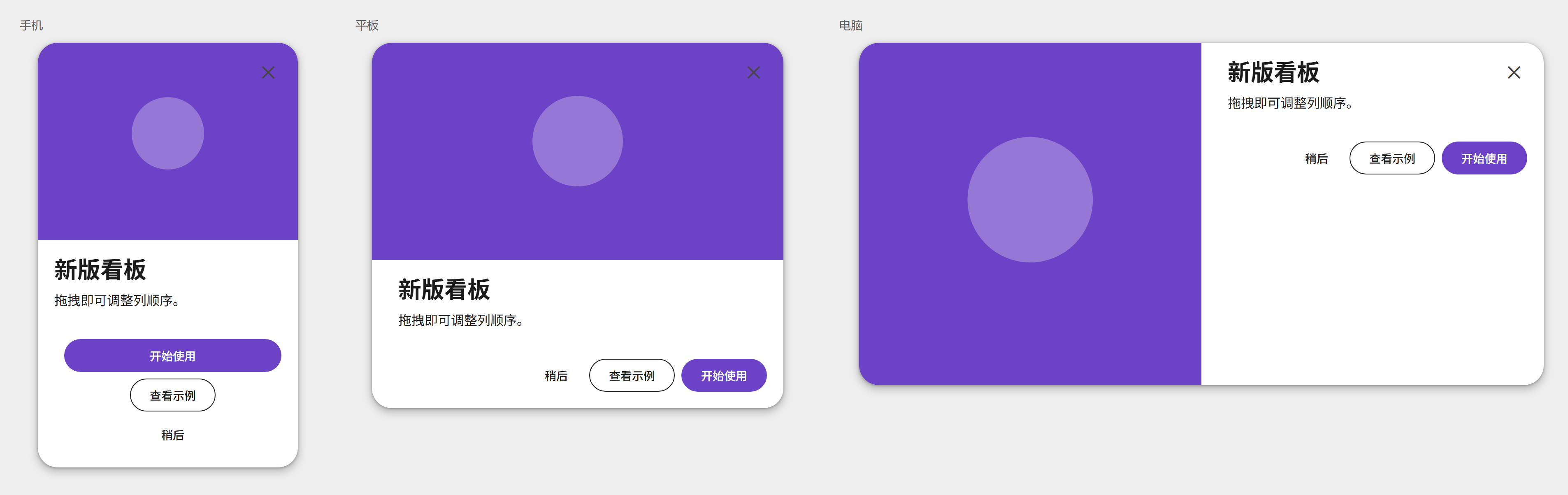
从左到右是手机、平板、电脑三种宽度。type="walkthrough" 时底栏换成上一页和下一页。
content_copy
check
<md-hero-modal open size="tablet" type="default" content-margin scroll-bar close
    show-cancel show-secondary-action show-tertiary-action tertiary="button">
  <img slot="hero" src="hero.png" alt="">
  <section><h2>新版看板</h2><p>拖拽即可调整列顺序。</p></section>
  <span slot="tertiary">了解更多</span>
  <span slot="cancel">稍后</span>
  <span slot="secondary">查看示例</span>
  <span slot="primary">开始使用</span>
</md-hero-modal>
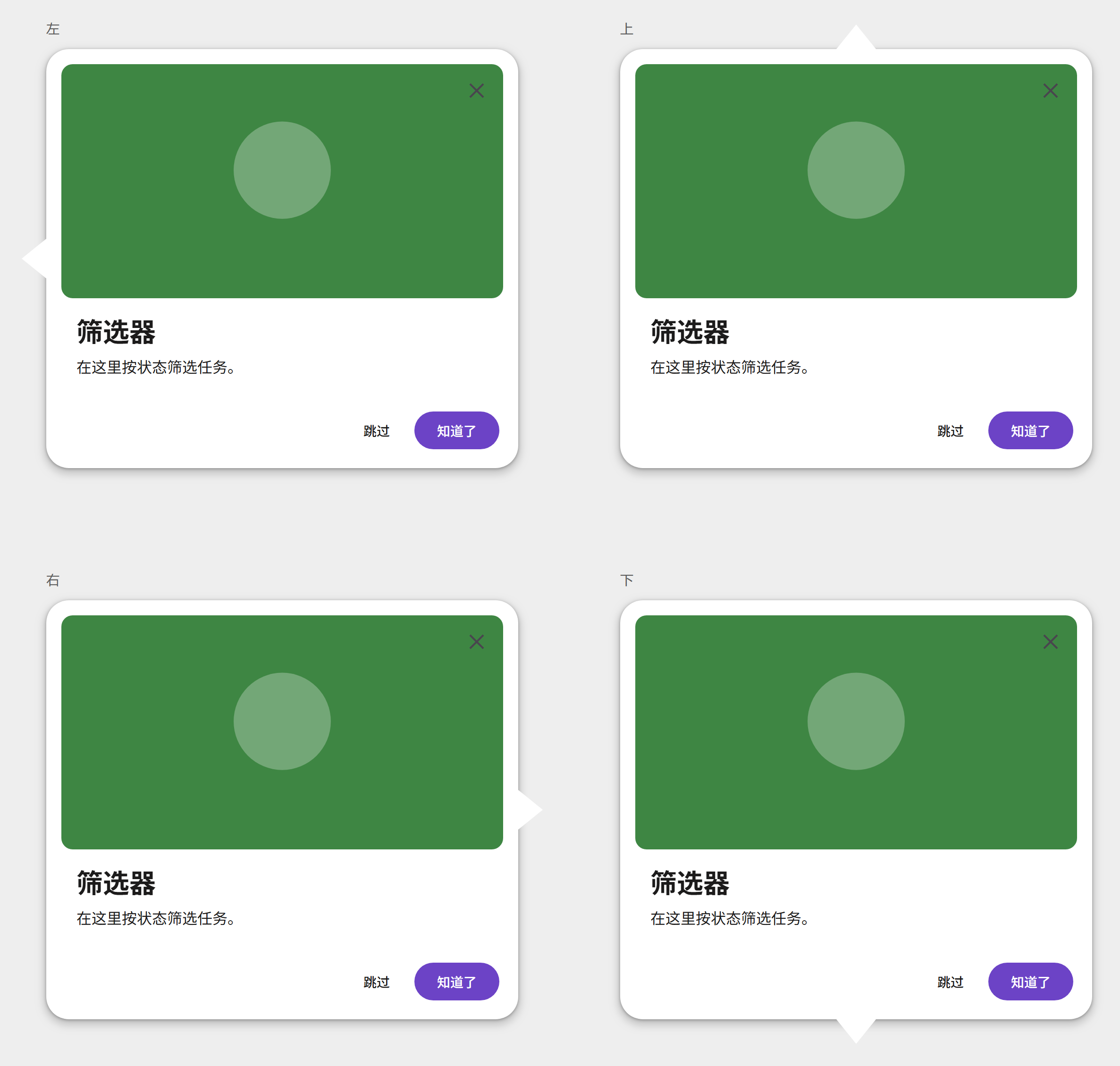
没有遮罩。箭头分别在左、上、右、下。
content_copy
check
<md-feature-tour-modal open caret="left" caret-position="start" type="default"
    content-margin scroll-bar close
    show-cancel show-secondary-action show-tertiary-action tertiary="checkbox">
  <img slot="hero" src="tour.png" alt="">
  <section><h2>筛选器</h2><p>在这里按状态筛选任务。</p></section>
  <span slot="tertiary">不再显示</span>
  <span slot="cancel">跳过</span>
  <span slot="secondary">上一步</span>
  <span slot="primary">知道了</span>
</md-feature-tour-modal>
上排是浮层,下排留在页面里。从左到右是大号、中号、小号。小号只有转圈,浮层小号是一块白卡片。完成后由页面把 complete 设为 true,转圈换成勾,卡片不自己关。
content_copy
check
<md-loading-modal open size="medium" container="modal" close actions title="正在导出报表">
  预计还需 30 秒,请勿关闭页面。
  <span slot="cancel">取消导出</span>
</md-loading-modal>
四类弹窗的属性不同,下面分表列出。
| 属性 | HTML 属性 | 类型 | 默认值 | 说明 |
|---|
returnValue | | string | '' | 关掉时写入。主按钮是 primary,次要是 secondary,第三操作是 tertiary,关闭按钮是 close。取消时为空。只能用脚本读写。 |
variant | variant | "error" | "system" | "neutral" | "informational" | "success" | "destructive" | 'neutral' | 外观。取值 neutral、informational、success、error、destructive、system。 |
size | size | "narrow" | "wide" | 'narrow' | 宽度。narrow 最宽 448px,wide 最宽 640px。 |
contentMargin | content-margin | boolean | true | 正文是否留内容边距。默认开。要关掉只能在脚本里设为 false。 |
layout | layout | "horizontal" | "vertical" | "horizontal-fill" | 'horizontal' | 底栏排列。取值 horizontal、vertical、horizontal-fill。 |
showCancel | show-cancel | boolean | false | 是否显示取消按钮。 |
showSecondaryAction | show-secondary-action | boolean | false | 是否显示次要按钮。 |
showTertiaryAction | show-tertiary-action | boolean | false | 是否显示第三操作。 |
tertiary | tertiary | "button" | "checkbox" | 'button' | 第三操作的样子。取值 button、checkbox。 |
title | title | string | '' | 标题。 |
leadingItem | leading-item | boolean | true | 标题前是否显示图标。默认开。要关掉只能在脚本里设为 false。 |
icon | icon | string | '' | 标题前的图标连字。不写就用外观自带的图标。 |
subtitle | subtitle | string | '' | 副标题。还要打开 show-subtitle 才会显示。 |
showSubtitle | show-subtitle | boolean | false | 是否显示副标题。 |
closeButton | close | boolean | false | 是否显示右上角关闭按钮。HTML 属性是 close。 |
open | open | boolean | false | 是否打开。默认关。 |
| 事件 | 类型 | 冒泡 | 穿透 | 说明 |
|---|
open | Event | 否 | 否 | 正要打开。调用 preventDefault 可以拦住。 |
opened | Event | 否 | 否 | 打开动画结束后发出。 |
close | Event | 否 | 否 | 正要关闭。调用 preventDefault 可以拦住。returnValue 表示是哪个控件关掉的。 |
closed | Event | 否 | 否 | 关闭动画结束后发出。 |
cancel | Event | 否 | 否 | 点遮罩、按 Esc 或点取消按钮时发出。调用 preventDefault 可以拦住。 |
| 属性 | HTML 属性 | 类型 | 默认值 | 说明 |
|---|
returnValue | | string | '' | 关掉时写入。主按钮是 primary,次要是 secondary,第三操作是 tertiary,关闭按钮是 close。取消时为空。walkthrough 最后一页的下一步是 done。只能用脚本读写。 |
size | size | "mobile" | "tablet" | "pc" | 'mobile' | 宽度档。取值 mobile、tablet、pc。 |
type | type | "default" | "walkthrough" | 'default' | default 是说明,walkthrough 是分页。previous 和 next 只在 walkthrough 出现。 |
contentMargin | content-margin | boolean | true | 正文是否留内容边距。默认开。要关掉只能在脚本里设为 false。 |
scrollBar | scroll-bar | boolean | false | 内容超出时是否可以滚动。默认关,超出部分被裁掉。 |
showCancel | show-cancel | boolean | false | 是否显示取消按钮。只在 default 出现。 |
showSecondaryAction | show-secondary-action | boolean | false | 是否显示次要按钮。只在 default 出现。 |
showTertiaryAction | show-tertiary-action | boolean | false | 是否显示第三操作。只在 default 出现。 |
tertiary | tertiary | "button" | "checkbox" | 'button' | 第三操作的样子。取值 button、checkbox。 |
closeButton | close | boolean | true | 是否显示主图上的关闭按钮。HTML 属性是 close。默认开。要关掉只能在脚本里设为 false。 |
open | open | boolean | false | 是否打开。默认关。 |
| 事件 | 类型 | 冒泡 | 穿透 | 说明 |
|---|
open | Event | 否 | 否 | 正要打开。调用 preventDefault 可以拦住。 |
opened | Event | 否 | 否 | 打开动画结束后发出。 |
close | Event | 否 | 否 | 正要关闭。调用 preventDefault 可以拦住。 |
closed | Event | 否 | 否 | 关闭动画结束后发出。 |
cancel | Event | 否 | 否 | 点遮罩、按 Esc 或点取消按钮时发出。调用 preventDefault 可以拦住。 |
| 属性 | HTML 属性 | 类型 | 默认值 | 说明 |
|---|
returnValue | | string | '' | 关掉时写入。主按钮是 primary,次要是 secondary,第三操作是 tertiary,关闭按钮是 close。取消时为空。walkthrough 最后一页的下一步是 done。只能用脚本读写。 |
caret | caret | "left" | "top" | "right" | "bottom" | 'bottom' | 箭头方向。取值 left、top、right、bottom。 |
caretPosition | caret-position | "center" | "start" | "end" | 'center' | 箭头靠起点、居中或靠终点。取值 start、center、end。 |
type | type | "default" | "walkthrough" | 'default' | default 是说明,walkthrough 是分页。previous 和 next 只在 walkthrough 出现。 |
contentMargin | content-margin | boolean | true | 正文是否留内容边距。默认开。要关掉只能在脚本里设为 false。 |
scrollBar | scroll-bar | boolean | false | 内容超出时是否可以滚动。默认关,超出部分被裁掉。 |
showCancel | show-cancel | boolean | false | 是否显示取消按钮。只在 default 出现。 |
showSecondaryAction | show-secondary-action | boolean | false | 是否显示次要按钮。只在 default 出现。 |
showTertiaryAction | show-tertiary-action | boolean | false | 是否显示第三操作。只在 default 出现。 |
tertiary | tertiary | "button" | "checkbox" | 'button' | 第三操作的样子。取值 button、checkbox。 |
closeButton | close | boolean | true | 是否显示主图上的关闭按钮。HTML 属性是 close。默认开。要关掉只能在脚本里设为 false。 |
open | open | boolean | false | 是否打开。默认关。 |
| 事件 | 类型 | 冒泡 | 穿透 | 说明 |
|---|
open | Event | 否 | 否 | 正要打开。调用 preventDefault 可以拦住。 |
opened | Event | 否 | 否 | 打开动画结束后发出。 |
close | Event | 否 | 否 | 正要关闭。调用 preventDefault 可以拦住。 |
closed | Event | 否 | 否 | 关闭动画结束后发出。 |
cancel | Event | 否 | 否 | 按 Esc 或点取消按钮时发出。没有遮罩。调用 preventDefault 可以拦住。 |
| 属性 | HTML 属性 | 类型 | 默认值 | 说明 |
|---|
returnValue | | string | '' | 关掉时写入。关闭按钮是 close。点取消不改这个值。只能用脚本读写。 |
size | size | "small" | "medium" | "large" | 'large' | 尺寸。取值 large、medium、small。小号不显示标题、说明、关闭和取消。 |
container | container | "modal" | "inline" | 'modal' | modal 是带遮罩的卡片。inline 留在页面里,没有卡片底、阴影和遮罩。 |
closeButton | close | boolean | false | 是否显示关闭按钮。HTML 属性是 close。只在 modal 且不是小号时出现。 |
actions | actions | boolean | false | 是否显示实心取消按钮。只在 modal 且不是小号时出现。 |
complete | complete | boolean | false | 打开后转圈换成勾,卡片不自己关。show() 再打开时回到转圈。inline 没有 show(),把 complete 设回 false 即可。 |
title | title | string | '' | 标题。小号不显示。 |
open | open | boolean | false | 是否打开。默认关。container 为 inline 时不看这个属性。 |
| 事件 | 类型 | 冒泡 | 穿透 | 说明 |
|---|
open | Event | 否 | 否 | 正要打开。只在 container 为 modal 时发出。调用 preventDefault 可以拦住。 |
opened | Event | 否 | 否 | 打开动画结束后发出。 |
close | Event | 否 | 否 | 正要关闭。调用 preventDefault 可以拦住。 |
closed | Event | 否 | 否 | 关闭动画结束后发出。 |
cancel | Event | 否 | 否 | 点取消按钮时发出。遮罩和 Esc 不会发出。调用 preventDefault 可以拦住。取消不改 returnValue。 |
| 名称 | 说明 |
|---|
| 默认 | 正文 |
primary | 主按钮文字 |
secondary | 次要按钮文字。show-secondary-action 打开时出现 |
cancel | 取消按钮文字。show-cancel 打开时出现 |
tertiary | 第三操作。button 时是按钮文字,checkbox 时是复选框旁的文字 |
| 名称 | 说明 |
|---|
hero | 主图 |
| 默认 | 正文。没有 slot 的子元素各算一页,default 只显示第一页 |
primary | 主按钮文字。只在 default 出现 |
secondary | 次要按钮文字。只在 default 出现 |
cancel | 取消按钮文字。只在 default 出现 |
tertiary | 第三操作。只在 default 出现 |
previous | 上一页。只在 walkthrough 出现 |
next | 下一页。只在 walkthrough 出现。最后一页点它会关闭,returnValue 为 done |
插槽和主视觉弹窗相同。
| 名称 | 说明 |
|---|
hero | 主图 |
| 默认 | 正文。没有 slot 的子元素各算一页,default 只显示第一页 |
primary | 主按钮文字。只在 default 出现 |
secondary | 次要按钮文字。只在 default 出现 |
cancel | 取消按钮文字。只在 default 出现 |
tertiary | 第三操作。只在 default 出现 |
previous | 上一页。只在 walkthrough 出现 |
next | 下一页。只在 walkthrough 出现。最后一页点它会关闭,returnValue 为 done |
| 名称 | 说明 |
|---|
| 默认 | 说明文字。小号不显示 |
cancel | 取消按钮文字。要同时打开 actions |
用组件 CSS 变量覆盖。下面只列出 Sass 里标记为支持的变量。
| 变量 | 默认值 |
|---|
--md-modal-narrow-max-width | 448px |
--md-modal-wide-max-width | 640px |
全部样式:modal/internal/_modal.scss
| 变量 | 默认值 |
|---|
--md-hero-modal-content-max-height | 496px |
--md-hero-modal-content-width | 416px |
--md-hero-modal-inline | 20px |
--md-hero-modal-inline-wide | 32px |
--md-hero-modal-max-height | 640px |
--md-hero-modal-min-height | 416px |
--md-hero-modal-mobile-hero-height | 240px |
--md-hero-modal-mobile-width | 316px |
--md-hero-modal-pc-max-width | 832px |
--md-hero-modal-pc-min-width | 632px |
--md-hero-modal-pc-width | 832px |
--md-hero-modal-tablet-hero-height | 264px |
--md-hero-modal-tablet-max-width | 560px |
--md-hero-modal-tablet-min-width | 316px |
--md-hero-modal-tablet-width | 500px |
--md-hero-modal-title-gap | 8px |
--md-hero-modal-title-padding | 16px |
全部样式:hero-modal/internal/_hero-modal.scss
| 变量 | 默认值 |
|---|
--md-feature-tour-modal-caret-inset | 48px |
--md-feature-tour-modal-caret-length | 42px |
--md-feature-tour-modal-caret-outset | 26px |
--md-feature-tour-modal-close-inset | 4px |
--md-feature-tour-modal-content-max-height | 496px |
--md-feature-tour-modal-footer-inline | 20px |
--md-feature-tour-modal-hero-height | 248px |
--md-feature-tour-modal-hero-radius | 12px |
--md-feature-tour-modal-inline | 32px |
--md-feature-tour-modal-inset | 16px |
--md-feature-tour-modal-max-height | 640px |
--md-feature-tour-modal-max-width | 560px |
--md-feature-tour-modal-min-height | 416px |
--md-feature-tour-modal-min-width | 316px |
--md-feature-tour-modal-title-gap | 8px |
--md-feature-tour-modal-width | 500px |
全部样式:feature-tour-modal/internal/_feature-tour-modal.scss
| 变量 | 默认值 |
|---|
--md-loading-modal-close-inset | 16px |
--md-loading-modal-close-size | 40px |
--md-loading-modal-content-gap | 8px |
--md-loading-modal-content-padding-block-end | 20px |
--md-loading-modal-content-padding-block-start | 16px |
--md-loading-modal-content-padding-inline | 16px |
--md-loading-modal-footer-padding-block-end | 12px |
--md-loading-modal-footer-padding-block-start | 16px |
--md-loading-modal-footer-padding-inline | 16px |
--md-loading-modal-indicator-size | 48px |
--md-loading-modal-large-width | 520px |
--md-loading-modal-max-width | 520px |
--md-loading-modal-medium-title-gap | 2px |
--md-loading-modal-medium-width | 320px |
--md-loading-modal-message-padding-block-end | 4px |
--md-loading-modal-min-width | 320px |
--md-loading-modal-small-size | 80px |
--md-loading-modal-text-padding-block | 8px |
--md-loading-modal-text-padding-inline | 8px |
--md-loading-modal-title-gap | 4px |
--md-loading-modal-viewport-gutter | 40px |
全部样式:loading-modal/internal/_loading-modal.scss